
Infrastructure as Code Azure: A Practitioner's Guide
September 20, 2026•CloudCops
Azure gets messy fast when a team grows past a handful of engineers. One person fixes a networking rule in the portal, another adjusts an app setting on a live resource, and a release pipeline later pushes a template that assumes none of that happened. The deployment succeeds. The service still breaks.
That's the point where many teams stop treating infrastructure as code on Azure like a nice-to-have. They start treating it like production hygiene. The challenge isn't getting your first template to deploy. It's keeping Azure environments governable after deployment, preventing drift without freezing delivery, and choosing tooling that won't trap you six months later.
Why Infrastructure as Code Matters on Azure
The failure mode is familiar. A developer gets paged, signs into the Azure portal, changes a VM setting or a subnet rule, and restores service. Everyone goes back to sleep. A day later, the pipeline runs again and wipes out that fix because the change never made it back into code.
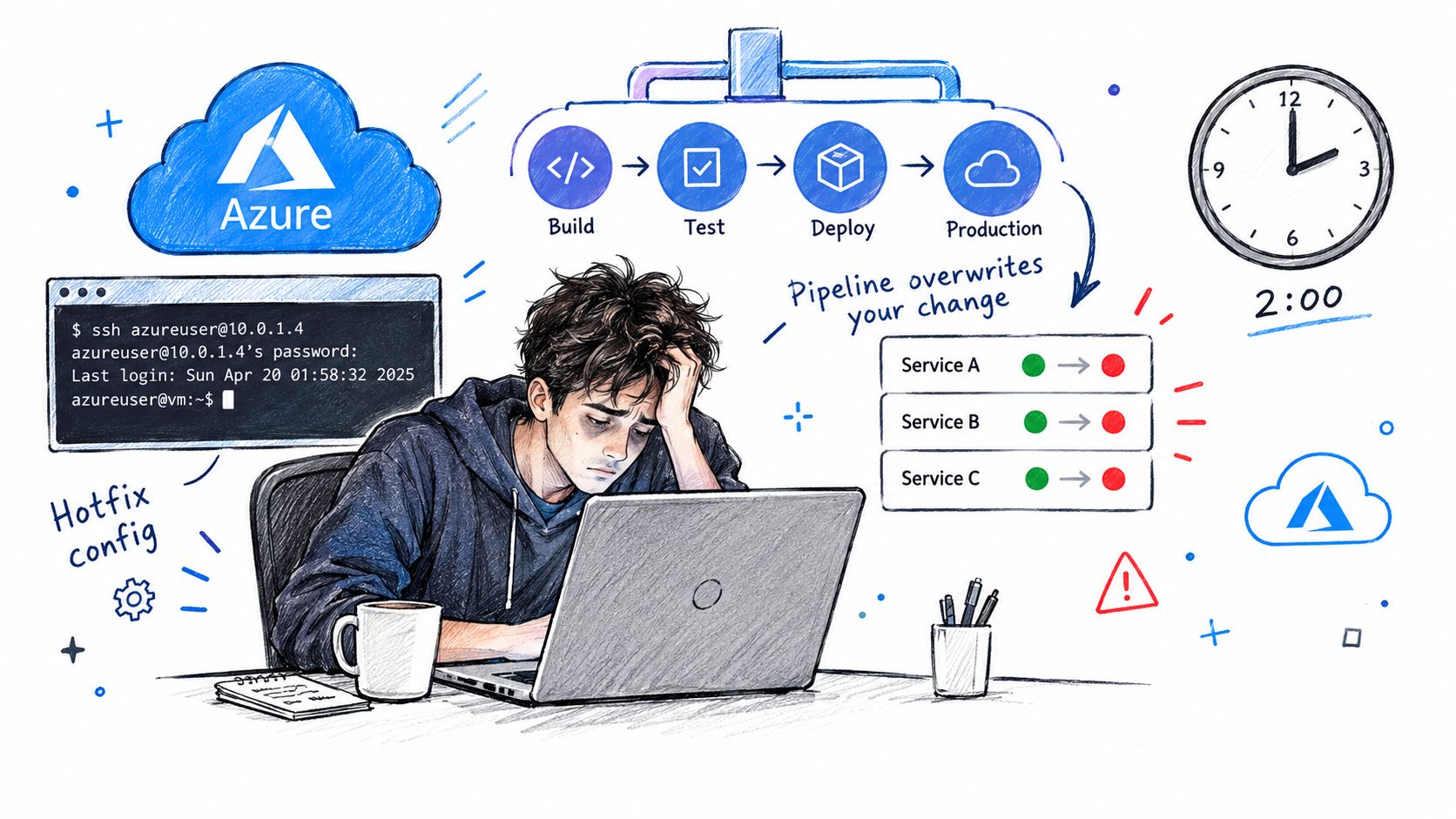
That isn't a tooling bug. It's drift. Azure makes manual change easy, and that convenience becomes operational debt when teams rely on portal edits, ad hoc scripts, or one-off fixes that nobody can audit later.
Drift is the real outage multiplier
Most Azure incidents tied to infrastructure aren't caused by code alone. They come from the combination of code plus undocumented manual changes. A storage account setting changes outside the repo. A managed identity gets an urgent role assignment in production. A network rule is opened temporarily and stays that way because nobody wants to touch it again.
Infrastructure as code Azure practices turn those fragile fixes into declared state. Instead of guessing what production should look like, the team can inspect a repository, review a pull request, and redeploy the same intent repeatedly.
Microsoft's own Azure guidance emphasizes version control, repeatable deployments, and deployment history as core benefits of infrastructure as code, and Azure tracks deployments so teams can review the template used, parameter values, and outputs after each run in the portal through Azure Resource Manager template guidance.
Practical rule: If a change is important enough to make in production, it's important enough to survive the next deployment.
Azure rewards teams that stop clicking in the portal
Azure's platform direction has been moving toward code for a long time. Azure Resource Manager launched in April 2014 at Build 2014, alongside the new Azure portal, and Microsoft positioned it as Azure's deployment and management layer for declarative infrastructure in this Azure IaC history reference. That mattered because it gave Azure a native control plane built for repeatability rather than one-time provisioning.
For smaller organizations moving from traditional hosted infrastructure, it helps to understand where cloud operations differ from older service models. This overview of IaaS for East Midlands businesses is a useful baseline for teams modernizing their operating model before they formalize Azure automation.
If you're cleaning up an estate that already has drift, a practical starting point is to standardize naming, modularize deployments, and treat every portal change as a bug to be removed over time. This write-up on Azure infrastructure as code best practices is worth bookmarking for that operational lens.
Understanding Azure Resource Manager and ARM Templates
Before debating Bicep versus Terraform, it helps to understand what deploys Azure resources. The answer is Azure Resource Manager, usually shortened to ARM. Every serious Azure infrastructure workflow ends up going through it.
ARM is the control plane, not just a template format
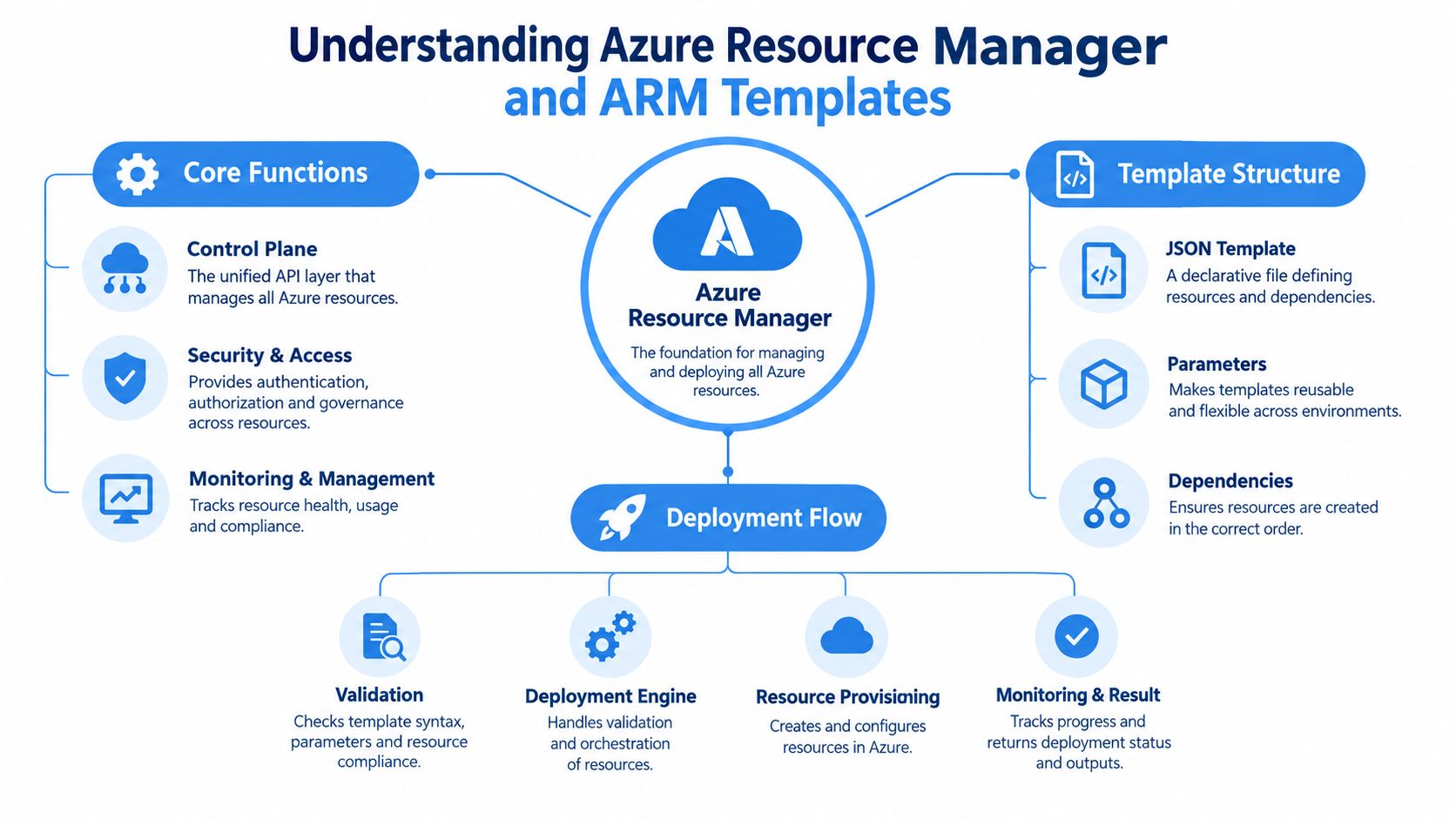
A lot of teams use “ARM” to mean JSON templates. That's incomplete. ARM is the deployment and management layer for Azure solutions, while ARM templates are JSON files that define infrastructure and configuration declaratively, as described in Microsoft's documentation and summarized in Azure Resource Manager templates on Microsoft Learn.
That distinction matters in practice. Bicep compiles down to ARM. Many portal-driven deployments still flow through ARM. Even third-party tools often rely on Azure APIs governed by the same control-plane behaviors. If you don't understand ARM, you'll misread deployment outcomes and drift behavior later.
What tracked deployments give you
One of ARM's most practical operational features is tracked deployment history. After a deployment, Azure can show the template used, parameter values, and outputs. That turns post-incident review into something better than archaeology.
When teams skip this and rely on shell scripts or undocumented portal changes, recovery gets slower. You don't just need to know what failed. You need to know what changed, in what scope, with what inputs.
A useful mental model is this:
- Template or module authoring defines desired state.
- ARM validation and orchestration interprets that desired state.
- Deployment history gives operators an audit trail for what ran.
Tracked deployments don't replace Git history. They complement it by showing what Azure accepted and processed at deployment time.
Incremental and complete mode are not a minor setting
Deployment mode is one of the easiest Azure details to underestimate. Microsoft's guidance is explicit. Incremental mode is the default and only adds or updates resources defined in the template, leaving unspecified resources untouched. Complete mode deletes resources in the target scope that aren't defined in the template, according to Microsoft's ARM deployment modes training guidance.
That gives complete mode real value for strict drift cleanup, but it also raises blast radius risk. In a large subscription or shared resource group, that risk is obvious.
Use these rules in production:
- Default to incremental when multiple teams share a scope.
- Use complete mode selectively for tightly controlled scopes where the template is the sole source of truth.
- Run what-if first whenever deletion is even remotely possible.
The what-if preview is one of the safest habits you can build on Azure. It catches intent mismatches before the platform turns them into resource changes.
Comparing Bicep, Terraform, OpenTofu, and Pulumi on Azure
The wrong question is often the first one asked. They ask which tool is best. The better question is which tool creates the least regret for your operating model.
Start with platform fit, not syntax preference
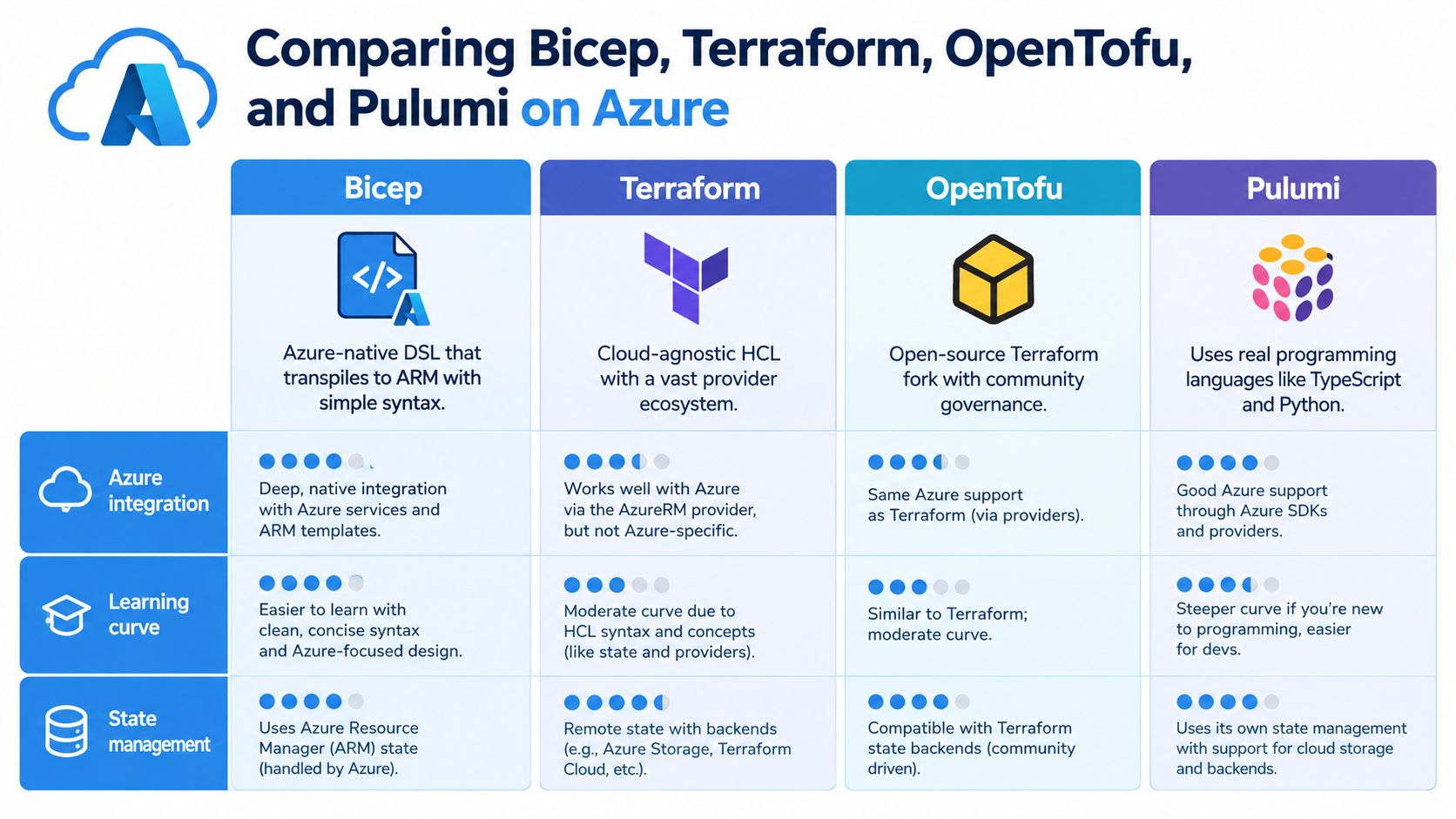
Bicep is Azure-native. It maps closely to Azure resource models and transpiles to ARM. For Azure-heavy environments, that usually means simpler authoring for resource groups, role assignments, managed identities, and policy-related resources.
Terraform remains the standard choice when teams want one workflow across Azure, AWS, and Google Cloud. OpenTofu belongs in the same strategic conversation because many organizations want Terraform-style workflows with an open governance model. Pulumi fits teams that prefer writing infrastructure in general-purpose languages such as TypeScript or Python.
The decision gap is often ignored. Azure-native integration and multi-cloud portability solve different problems. Recent industry commentary notes that Bicep is increasingly framed as Azure's native IaC language, while Terraform still dominates much customer search interest and adoption across Azure deployments, which is part of why the choice remains so contested in this Azure governance and architecture discussion.
The criteria that actually matter
Use this decision frame instead of feature checklists:
- Choose Bicep when your platform is Azure-specific and you want close alignment with Azure constructs, ARM behavior, and Microsoft's native IaC direction.
- Choose Terraform or OpenTofu when portability matters across cloud providers, business units, or acquisition scenarios.
- Choose Pulumi when your engineering culture strongly prefers software-language abstractions and can govern that flexibility.
- Use mixed tooling when the platform layer and workload layer have different constraints.
A lot of platform teams underestimate provider update latency, policy integration differences, and future cloud-exit cost. Those aren't academic concerns. They shape how long it takes to support a new resource type, how easy it is to hire for the stack, and how painful migration becomes later.
This comparison of Terraform vs OpenTofu is useful if your decision is less about Azure specifically and more about governance, licensing posture, and long-term maintainability.
For a quick visual walkthrough of the trade-offs, this video is a solid supplement:
What works in practice
Bicep works well when a central platform team owns landing zones, identity boundaries, policy, and shared networking. Terraform or OpenTofu works well when application teams also provision resources in other clouds or need a portable module model.
Pulumi can be effective, but it needs stronger engineering discipline than many infrastructure teams expect. Giving everyone a full programming language also gives them more ways to create inconsistent patterns.
Don't pick a tool based on what your best engineer enjoys writing. Pick it based on who has to operate it at 2 AM.
Building GitOps Pipelines for Azure with ArgoCD and FluxCD
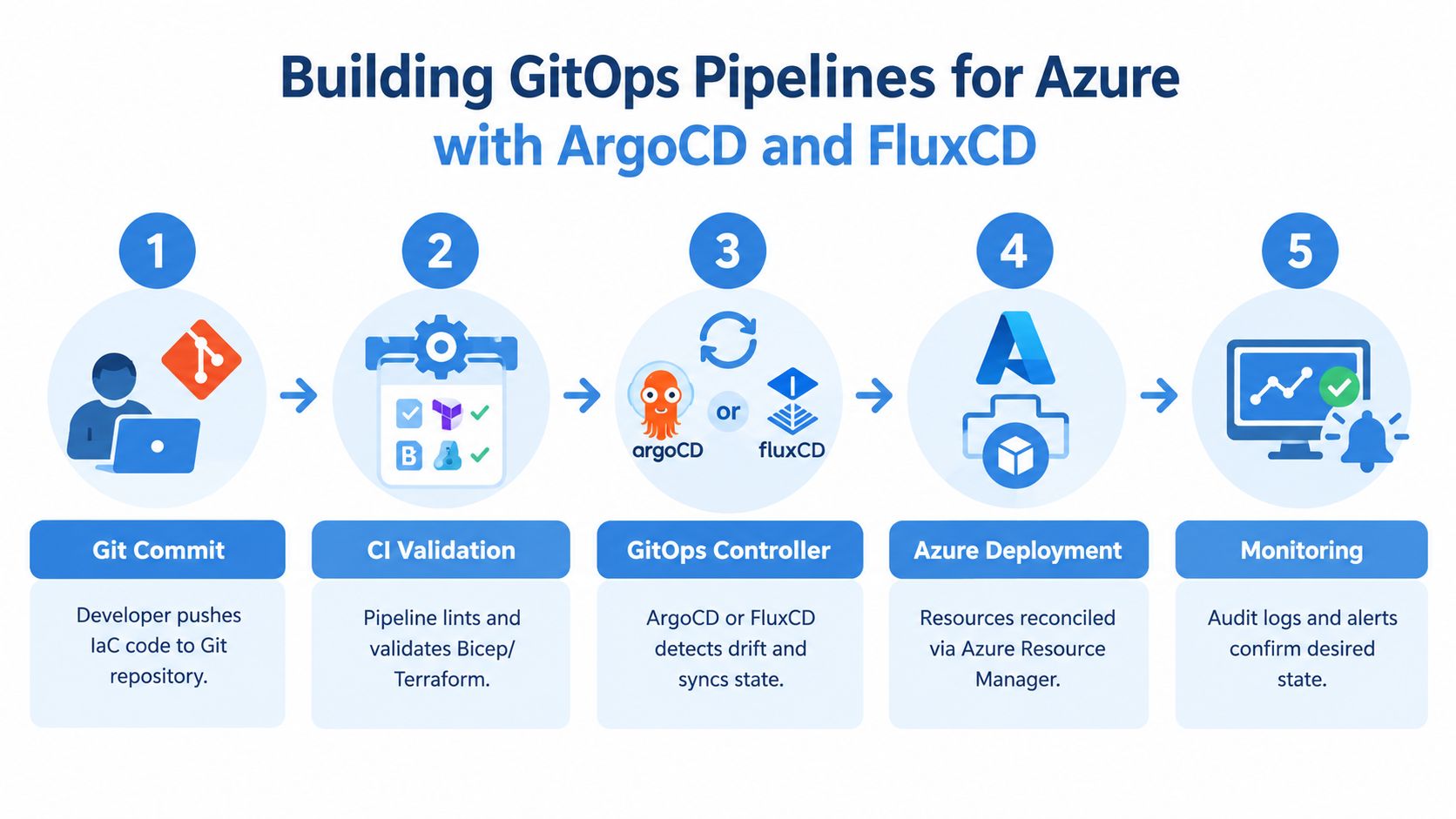
A repository full of IaC files isn't an operating model. It becomes one when Git is the approval path, the audit trail, and the trigger for reconciliation.
The GitOps shape that scales
On Azure, GitOps usually matters most around AKS, cluster services, platform add-ons, policy bundles, and the operational layer that sits above raw resource provisioning. ArgoCD and FluxCD both work, and both reward a layered repository structure.
A workable model has five layers:
- Application manifests for service-level Kubernetes resources.
- Platform modules for shared components such as ingress, secrets integration, and observability agents.
- Cluster configuration for environment-specific settings and add-on enablement.
- Security policies for admission controls, network constraints, and baseline guardrails.
- Pipeline definitions for validation, promotion, and deployment automation.
The mistake that causes noisy syncs
Flat repositories look convenient at the start. Then a dashboard change triggers a broader sync than expected, or a shared configuration folder creates coupling between unrelated services. ArgoCD and FluxCD will reconcile what you tell them to reconcile. Bad repository boundaries become operational noise.
Use separate reconciliation scopes where possible. Keep application repos independent from platform repos. Keep cluster bootstrap code separate from day-two workload changes. Rollbacks are cleaner when one commit maps to one layer of change.
A practical primer on what ArgoCD is helps if your team still thinks of GitOps as only a Kubernetes deployment tool rather than a control pattern.
What a healthy Azure GitOps flow looks like
The cleanest setups follow a simple rhythm:
- A developer opens a pull request for a Bicep module, Terraform stack, or Kubernetes manifest.
- CI validates formatting, linting, policy checks, and plan output.
- Approved changes merge to the target branch.
- ArgoCD or FluxCD detects drift between Git and the cluster or platform configuration.
- The controller reconciles toward desired state and surfaces sync status visibly.
GitOps works when the cluster tells you it has drifted. It fails when humans have to remember that it probably drifted.
For Azure teams, the payoff is less about trendy workflow language and more about traceability. You can tie a production change to a commit, a review, a controller action, and a rollback path. That's far safer than reconstructing who changed what in the portal after the fact.
Security and Policy-as-Code in Azure IaC Workflows
Security gates work best when they're boring. If every release turns into a negotiation with a separate control function, teams will route around it. If the controls run in the same path as normal development, they become part of delivery.
Microsoft's Azure Well-Architected guidance pushes declarative infrastructure as code for repeatability and operational excellence, and its current guidance also leans toward Azure Verified Modules and pipeline-based enforcement in larger estates through Azure operational excellence guidance for infrastructure as code. That's the right direction because standard modules reduce variation before policy has to catch it later.
Shift security left without creating a bottleneck
Recent Azure guidance also notes that Defender for Cloud can scan GitHub or Azure DevOps repositories for IaC vulnerabilities. That matters because it moves review earlier. Teams can catch risky network exposure, weak defaults, or policy conflicts before merge instead of after deployment.
A practical Azure pipeline usually combines several layers:
- Verified modules first so common resources start from governed defaults.
- Pre-merge validation for naming, tags, encryption expectations, and network isolation requirements.
- Policy-as-code checks in CI so obvious violations fail before apply.
- Cluster admission controls such as OPA Gatekeeper on AKS for runtime enforcement where Kubernetes objects are involved.
Governance should be selective, not universal
The trap is applying the same level of control to every workload. A regulated payments platform and an internal experiment don't need identical friction. Strong platform teams define where policy is mandatory and where teams get room to move.
That means separating guardrails into categories:
| Control area | Best place to enforce |
|---|---|
| Naming, tags, baseline config | CI and module standards |
| Resource posture and compliance | Policy-as-code and Azure policy layers |
| Kubernetes admission constraints | OPA Gatekeeper on AKS |
| Repo vulnerability scanning | Defender for Cloud integration |
Security doesn't slow delivery when the rules are predictable and automated. It slows delivery when engineers only discover the rules after they've already built the wrong thing.
Avoiding Azure IaC Template Limits and Scale Pitfalls
Many Azure estates don't break because the architecture is ambitious. They break because the template became too large, too parameter-heavy, or too tangled to reason about.
Microsoft's documented ARM template constraints are hard boundaries, not soft guidance. ARM templates and parameter files are each capped at 4 MB, individual resource definitions at 1 MB, with limits of 256 parameters, 512 variables, 800 resources, 64 outputs, 10 unique locations per subscription, tenant, or management-group scope, and 24,576 characters per template expression, according to Azure Resource Manager template best practices.
Azure IaC Template Limits
| Limit | Value | Impact |
|---|---|---|
| Template size | 4 MB | Large monolithic templates fail validation or become hard to maintain |
| Parameter file size | 4 MB | Environment data can outgrow a single parameter file |
| Resource definition size | 1 MB | Complex resources can force decomposition |
| Parameters | 256 | Over-parameterized designs become brittle |
| Variables | 512 | Excessive in-template logic gets hard to manage |
| Resources | 800 | Large deployments must be split into smaller units |
| Outputs | 64 | Shared output contracts need discipline |
| Unique locations at certain scopes | 10 | Broad multi-region scopes can hit control-plane constraints |
| Template expression length | 24,576 characters | Complex string assembly and nested logic can break parsing |
Monoliths look tidy until they hit the ceiling
Teams often start with one “master template” because it feels centralized. Then they add optional components, environment conditions, nested logic, and long parameter lists. The template still deploys, until it doesn't.
The first signs are usually practical rather than elegant. Validation becomes painful. Pipelines fail on parser or size boundaries. Engineers become afraid to edit shared files because one change can affect too much at once.
Split by lifecycle, not just by resource type
The usual advice is “modularize,” which is true but incomplete. Split deployments by change cadence, ownership, and blast radius.
- Platform foundation should usually stand apart from application stacks.
- Shared identity and networking deserve their own deployment units.
- Environment-specific overlays should stay thin and data-driven.
- High-churn services shouldn't sit in the same deployment bundle as low-change core infrastructure.
A good module boundary is one that lets a team change what they own without forcing unrelated teams to retest everything else.
If a template is large because one resource is intrinsically complex, refactor the module. If it is large because many unrelated resources deploy together, split the deployment unit.
Designing a Hybrid Architecture for Azure Platforms
The cleanest Azure platforms usually aren't pure Bicep shops or pure Terraform shops. They use each tool where its strengths map to the operating model.
Put Azure-specific control where Azure-specific risk lives
For shared platform concerns such as networking, identity, policy, and management-group level controls, Bicep is often the sharper tool. It aligns closely with Azure's native deployment layer and fits environments where the platform team wants strong control over landing zones and guardrails.
For application workloads that may need to remain portable, Terraform or OpenTofu often makes more sense. That's especially true when product teams already ship across multiple clouds, depend on cloud-agnostic workflows, or need a cleaner future exit path.
This hybrid split avoids a common mistake. Teams force every use case into one tooling standard, then discover they optimized for platform control at the expense of product autonomy, or for portability at the expense of Azure-native governance.
Standardization and autonomy need different boundaries
The design problem is not syntax. It's ownership.
A workable model looks like this:
- Central platform team owns Azure-specific guardrails, shared network topology, identity boundaries, and policy baselines.
- Product teams consume approved modules and deploy workload resources inside those boundaries.
- Portable stacks stay portable where business logic or vendor flexibility matters.
- Azure-native stacks stay native where compliance and control-plane fidelity matter more.
This is also where operational metrics help. If governance is helping, deployment reviews become clearer, rollback paths improve, and teams spend less time chasing undocumented changes. If governance is hurting, lead time stretches, exceptions pile up, and teams start bypassing the standard path.
For teams that also need to keep a close eye on operating spend across mixed estates, this guide on how to control hybrid cloud costs with MR2 Solutions is a useful complement to architecture planning.
CloudCops GmbH is one example of a consultancy that works in this hybrid model, combining Azure-focused and cloud-agnostic IaC approaches with GitOps and policy-as-code where organizations need both governance and portability.
Recommended Repo Layout and Migration Checklist
Most Azure IaC problems trace back to repository sprawl, unclear ownership, or migration shortcuts. A repo should make the operating model obvious.
A repo layout that scales
A practical layout for infrastructure as code on Azure often looks like this:
- platform/ for shared Bicep or Terraform modules covering networking, identity, policy, and base services
- environments/ for environment data such as parameter files, tfvars, or overlays
- workloads/ for application-specific infrastructure stacks
- gitops/ for ArgoCD or FluxCD app definitions, cluster config, and policy bundles
- pipelines/ for CI validation, plan, approval, and apply workflows
- docs/ for ownership boundaries, deployment rules, and exception handling
That structure does two things well. It separates shared foundations from workload delivery, and it keeps environment differences in data rather than duplicated code.
Migration checklist for a live Azure estate
Use this sequence when moving from manual Azure operations into code:
- Inventory what exists. Focus first on shared networking, identity, policy, and production workloads.
- Find manual drift. Compare portal reality with scripts, tribal knowledge, and existing repos.
- Define ownership boundaries. Decide what the platform team owns versus what product teams can change.
- Build initial modules. Start with high-value shared resources, not every edge case.
- Add CI gates. Lint, validate, and review before any apply step reaches production.
- Introduce drift monitoring. Use deployment history, GitOps sync state, and policy reporting to surface unauthorized change.
- Measure delivery impact. Track deployment frequency, change failure rate, and mean time to recovery to see whether governance is helping.
Start with the infrastructure people touch most often. That's where code will remove the most operational friction fastest.
IaC on Azure isn't finished when the first deployment works. It becomes valuable when the codebase survives staff turnover, urgent fixes, audits, and the next wave of platform growth.
CloudCops GmbH helps teams turn Azure infrastructure into a governed delivery system with Terraform, OpenTofu, GitOps, policy-as-code, and cloud-native platform engineering practices. If you're trying to reduce drift, choose the right Azure IaC tooling, or design a hybrid platform model that product teams can use, visit CloudCops GmbH.
Ready to scale your cloud infrastructure?
Let's discuss how CloudCops can help you build secure, scalable, and modern DevOps workflows. Schedule a free discovery call today.
Continue Reading
Cloud Native Observability: A Practical Engineering Guide
Master cloud native observability with OpenTelemetry and CNCF tools. Learn to correlate signals, control costs, and reduce MTTR in Kubernetes environments.
ISO 27001 Automation: A Practical Cloud-Native Guide
ISO 27001 Automation. Learn how to automate ISO 27001 in cloud-native environments with policy-as-code, IaC checks, CI/CD evidence, and audit-ready workflows.

Automation ROI Calculation: A Practitioner's Guide
Master automation ROI calculation with a step-by-step methodology for quantifying savings, hidden benefits, and stakeholder-ready presentations.